Showing posts with label and. Show all posts
Showing posts with label and. Show all posts
Tuesday, August 20, 2013
Light Touch Regulation AT T and Vodafone
 |
| AT&T Technology |
This year, WAC showed off its first commercial results, but the operator keynotes put another burning concern, spectrum regulation for 4G, top of the agenda. The cellco chiefs are calling for a far "lighter touch" in future spectrum policies, more suited to a world driven by fast, always-on connectivity and cloud services. "As 4G and the cloud proliferate, customer expectations for openness and seamless access to all services will increase," said AT&T CEO Randall Stephenson.
Given the huge amount of investment carriers must make in 4G networks and cloud services, they need "a predictable regulatory environment with a light touch. "Vodafone CEO Vittorio Colao also called for regulatory approaches that would encourage openness, investment and competition, and predictably criticized over-burdensome or repetitive spectrum fees. Telcos are the biggest contributors to ICT investment, Alierta said.
In a keynote address at the Mobile World Congress here, AT&T Chairman Randall Stephenson today prodded carriers, manufacturers and regulators around the globe to create openness and interoperability in mobile devices, platforms and networks. His remarks even included some polite digs at Apple for requiring iTunes songs and App Store apps to run on Apple devices.
Speaking to a global audience, Stephenson said wireless smartphones and tablets need to be able to operate across countries and geographies in what is known as "spectrum harmony." He noted that a lack of international interoperability is currently a major obstacle for wireless telecommunications.
"If our object is to grow the [wireless] pie, interoperability is necessary," he said. Stephenson was joined in the crowded keynote session by several executives from carriers around the globe who also issued calls for openness. Wang Jianzhou, chairman of China Mobile, also touched on the theme of keeping networks and devices open, noting that his company has pursued interoperability with carriers in Japan and South Korea.
"An open and interoperable environment ... will drive mobile broadband, and mobile broadband with the cloud will drive the next wave." "The customer experience is agnostic," he noted. Noting that the songs people buy on iTunes are currently "Apple OS- and device-dependent," he said, "but well see [marketing and financial] models less dependent on the device" in the future.
Regarding video downloads, Stephenson said that half of tablets and laptops today are streaming video content in the U.S. but customers cant easily port those videos from one device to another, and they incur some expense if they do.
By. AT&T Technology

Saturday, August 10, 2013
Alcatel One Touch Snap and LTE User Manual Guide Pdf
Alcatel One Touch Snap and LTE User Manual Guide Pdf - In performances Mobile World Congress (MWC) in 2013 has indeed been used as a platform to Nokia introduces two new products they are One Touch One Touch Snap Snap and LTE, as quoted on the tech site GSMArena, on Wednesday (27-2-13).
By using the kitchen runway quad-core processor and a 1.2 GHz CPU speed, both phones will also be equipped with 1 GB RAM. Alcatel One Touch Screen Snap has a size of 4.5-inch qHD resolution complete with a screen protector that has Dragontail Glass technology, the technology is able to withstand scratches that may occur if you use the nail on the use of the screen.
 |
| Google Images |
In terms of operating system, this phone will be running the latest OS ie Andorid 4.2 Jelly Bean and battery capacity of 1800 mAh. Alcatel One Touch Power Snap battery can last over a period of 7 hours for the need to call or use when you connect to 3G networks and 240 hours stand-by time power. Equipped with a 4 GB internal memory which can be expanded with an external memory slot for external memory is also provided so that the phone becomes larger capacity.
On the back side of the phone there is a main camera with a resolution of 8 MP complete with LED flash and 720p video record. Front camera is also provided at mobile Alcatel One Touch Snap it, the resolution is 1.3 MP and can also be used to record video with a resolution of 720p. Alcatel One Touch Snap has a size of 130.3 x 67 x 8.99 mm, but unfortunately weighs unknown because Samsung has not revealed the exact weight.
While the Alcatel One Touch Snap LTE version will be equipped with a wide screen that is wider than the Alcatel One Touch Snap non-LTE. Namely measuring 4.65-inches but the resolution is lower than Alcatel One Touch Snap non-LTE, which is just a FWVGA (480 x 854 pixels). But take it easy, the Alcatel One Touch Snap LTE technology is also equipped with the same protection as non LTE version.
Resolution main camera is 8 MP is the same but the LTE version is capable of recording video with full-HD resolution. Resolution 2 MP front camera. In terms of body dimensions thinner than the Alcatel One Touch Snap non-LTE, this phone has dimension of 134 x 69.6 x 10.9 mm and a capacity of 2200 mAh battery battery.
Another limitation on the Alcatel One Touch Snap LTE is still using the operating system Android 4.1 Jelly Bean is not using the latest version 4.2.1. Besides different from both versions of LTE processors already use dual-core Snapdragon processor and a 1.4 GHz CPU speed. Connectivity Power will use the standard smartphone is a Wi-Fi 802. 11 b / g / n, Bluetooth 4 and quadband GSM (850/900/1800/1900). Estimated Alcatel One Touch Snap and Snap LTE Alcatel One Touch will present the global market in April and July.
Sorry, Alcatel One Touch Snap User Manual Guide Pdf is Not Available Yet Now
Sorry, Alcatel One Touch Snap LTE User Manual Guide Pdf is Not Available Yet Now
Wednesday, July 31, 2013
LG Nexus 4 Manual User Guide Specification and Price
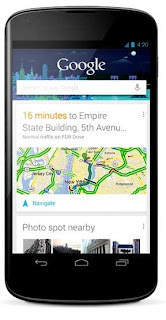
LG Nexus 4 Manual User Guide - This LG Nexus four manual / user guide is revealed by LG at its official website. This LG Nexus four manual / user guide is obtainable in English. for brand spanking new owner of LG Nexus four smartphone, youll would like this user guide to boost your experiences whereas victimization this device. This LG Nexus four user manual comes in PDF file format with two.99 MB in size (235 pages). improvements and changes to this LG Nexus four user manual necessitated by typographical errors, inaccuracies of current info, or improvements to programs and/or equipment, may be made by LG at any time and all of sudden. the data collected in this process is not associated with a particular identity. we have a tendency to use it to judge however visitors use our website and to boost the LG Nexus four usability, performance, and problems finding.
 |
| Google Images |
Taken from LG website and also from several sources, LG Nexus 4 comes with these specification :
General
- Device name: LG Nexus 4
- Type: Smartphone
- Release: 2012, November
- Price: $299
Body
- Dimension: 5.27 x 2.70 x 0.36 in
- Weight: 4.90 oz
- Color: Black
Technology
- Network: HSPA+ 42, 3G (850, 900, 1700, 1900, 2100 MHz)
- Operating System: Android 4.2 (Jelly Bean)
- Processor: Quad-core 1.5 GHz Krait
- Chipset: Qualcomm Snapdragon™ S4 Pro CPU
- GPU: Adreno 320
- RAM: 2 GB
Display
- Type: WXGA IPS
- Size: 4.7″ diagonal, 1280 x 768 pixel resolution (320 ppi)
- Multitouch: Yes
- Protection: Corning® Gorilla® Glass 2
Storage
- Internal storage: 8GB or 16GB (actual formatted capacity will be less)
- Card slot: No
Camera
- Rear facing camera: 8 MP
- Video: 1080p@30fps
- Front facing camera: 1.3 MP
- Camera features: autofocus, LED flash, touch focus, geo-tagging, face detection, photo sphere
Connectivity
- Data speed: DC-HSDPA, 42 Mbps; HSDPA, 21 Mbps; HSUPA, 5.76 Mbps
- WLAN: Wi-Fi 802.11 a/b/g/n, dual-band, DLNA, Wi-Fi hotspot
- Bluetooth: v4.0 with A2DP
- Location: GPS with A-GPS support and GLONASS
- USB: microUSB (SlimPort) v2.0
- Headphone jack: 3.5mm
Battery
- Type: Li-Po
- Capacity: 2100mAh
- Talktime: Up to 15 h
- Stand-by time: Up to 390 h
Table of Contents (LG Nexus 4 User Manual) :
- Get started
- Explore your phone
- Use the Phone app
- Use the keyboard
- Try some apps
- Use Google Now & Search
- Accessibility
- Wireless & network settings
- Device settings
- Security settings
- Personal, account & system settings
- Appendix: Hardware reference
For more complete information about operating instruction the LG Nexus 4, download the user manual below. The LG Nexus 4 manual can be found for free at LG official website. It is provided in PDF file. We are NOT affiliated with LG. Read our disclaimer to know more.
Download Free LG Nexus 4 user manual (PDF file; 2.99 MB)
General
- Device name: LG Nexus 4
- Type: Smartphone
- Release: 2012, November
- Price: $299
Body
- Dimension: 5.27 x 2.70 x 0.36 in
- Weight: 4.90 oz
- Color: Black
Technology
- Network: HSPA+ 42, 3G (850, 900, 1700, 1900, 2100 MHz)
- Operating System: Android 4.2 (Jelly Bean)
- Processor: Quad-core 1.5 GHz Krait
- Chipset: Qualcomm Snapdragon™ S4 Pro CPU
- GPU: Adreno 320
- RAM: 2 GB
Display
- Type: WXGA IPS
- Size: 4.7″ diagonal, 1280 x 768 pixel resolution (320 ppi)
- Multitouch: Yes
- Protection: Corning® Gorilla® Glass 2
Storage
- Internal storage: 8GB or 16GB (actual formatted capacity will be less)
- Card slot: No
Camera
- Rear facing camera: 8 MP
- Video: 1080p@30fps
- Front facing camera: 1.3 MP
- Camera features: autofocus, LED flash, touch focus, geo-tagging, face detection, photo sphere
Connectivity
- Data speed: DC-HSDPA, 42 Mbps; HSDPA, 21 Mbps; HSUPA, 5.76 Mbps
- WLAN: Wi-Fi 802.11 a/b/g/n, dual-band, DLNA, Wi-Fi hotspot
- Bluetooth: v4.0 with A2DP
- Location: GPS with A-GPS support and GLONASS
- USB: microUSB (SlimPort) v2.0
- Headphone jack: 3.5mm
Battery
- Type: Li-Po
- Capacity: 2100mAh
- Talktime: Up to 15 h
- Stand-by time: Up to 390 h
Table of Contents (LG Nexus 4 User Manual) :
- Get started
- Explore your phone
- Use the Phone app
- Use the keyboard
- Try some apps
- Use Google Now & Search
- Accessibility
- Wireless & network settings
- Device settings
- Security settings
- Personal, account & system settings
- Appendix: Hardware reference
For more complete information about operating instruction the LG Nexus 4, download the user manual below. The LG Nexus 4 manual can be found for free at LG official website. It is provided in PDF file. We are NOT affiliated with LG. Read our disclaimer to know more.
Download Free LG Nexus 4 user manual (PDF file; 2.99 MB)
Monday, June 3, 2013
The Ultimate Free Memory Battery and CPU App with Amazing 3D Visuals
Tekton Technologies today is pleased to announce the enhanced release and immediate availability of System Monitor with Battery Max 1.5, their all-in-one comprehensive and artistic, health check meter for iPhone, iPad and iPod touch devices. System Monitor with Battery Max is a comprehensive Free Memory and Battery app along with a System Monitor utility, that monitors CPU Load on your device. This app provides a complete health check for iPhone/iPod touch systems and provides valuable details to alert you when the system resources reach the limits.
Look no further! System Monitor with Battery Max features amazing visuals like Speedometer view, 3D Bar charts, battery split and charger, provides you a rich visual experienced like you have never before experienced on your iPhone/iPod touch.
Features:
* Just Open the app and Wait for 5 Secs to see the memory getting freed
* Double Click Home button to see and Close unwanted apps
* Now you will quickly see the memory getting Freed on the Speedometer
* Just Open the app and Wait for 5 Secs to see the memory getting freed
* Double Click Home button to see and Close unwanted apps
* Now you will quickly see the memory getting Freed on the Speedometer
* Double Tap Memory speedometer view to rotate to a 3D bar chart view
* Double tap battery or open it to see the battery capacity for your favorite apps
* Double tap the CPU speedometer view, to view a 3D CPU utilization
* Shows the used and free space
* Shows the IP address acquired, and hardware address of your device
* Double tap the CPU speedometer view, to view a 3D CPU utilization
* Shows the used and free space
* Shows the IP address acquired, and hardware address of your device
Thursday, May 30, 2013
Blackberry Q10 And The Full Specifications
Blackberry Q10 And The Full Specifications - Blackberry Q10 have been using the QWERTY keyboard makes it perform better than other smartphones. Blackberry Smartphone Q10 has been boosted with a 3.1-inch touch screen with a resolution of 720 x 720 pixels and a QWERTY keyboard. For the smartphone operating system uses a new OS that is BB10 using the Dual-core 1.5 GHz Cortex-A9. For ore details, check out below.

Blackberry Q10 And The Full Specifications :
- GENERAL 2G Network GSM 850/900/1800/1900
- 3G Network HSDPA
- Yes SIM
- BODY Dimensions 10.3 mm thickness
- Weight 139 g (4.90 oz)
- DISPLAY Type Super AMOLED capacitive touchscreen, 16M colors, Size 720 x 720 pixels, 3.1 inches (~ 328 ppi pixel density), Multitouch
- SOUND Alert types Vibration, MP3 ringtones, Loudspeaker, 3.5mm jack
- MEMORY Card slot microSD, up to 32 GB
- Internal 2 GB RAM
- DATA GPRS
- EDGE YesSpeed HSDPA, HSUPA WLAN Wi-Fi 802.11 a / b / g / n, dual-band, Wi-Fi hotspot, Bluetooth, v4.0 with A2DP, NFC, USB, microUSB v2.0
- CAMERA Primary
- Features Geo-tagging, continuous auto-focus, image stabilization, face detection
- Video Yes, Secondary
- FEATURES OS BlackBerry 10 OS, TI OMAP 4470 chipset, CPU Dual-core 1.5 GHz Cortex-A9, PowerVR SGX544 GPU, Sensors Accelerometer, gyro, proximity, compass, Messaging SMS, MMS, Email, Push Email, IM, BBM 6, Browser HTML5, Radio TBD, GPS , with A-GPS support, Java , MIDP 2.1
- Colors Black, White
- SNS integration
- BlackBerry maps
- Organizer
- Document viewer
- Photo viewer
- MP3/WMA/WAV/eAAC + / FLAC player
- DivX/XviD/MP4/WMV/H.263/H.264 player
- Voice memo / dial
- Predictive text input
- BATTERY Li-Ion 1800 mAh battery, Stand-by, Talk time Up to 10 h
Wednesday, April 10, 2013
Lenovo’s Chromebook 430 Blacked Out and ThinkPad Branded

Lenovo introduced its first Chromebook on Thursday — a laptop the company says is designed primarily for use in schools.
But while the Lenovo ThinkPad X131e Chromebook is priced at an affordable $430, it’s still more expensive than new Chromebooks from Acer ($200) and Samsung ($250).
So, what’s with the high price tag? For one thing, Lenovo has a few unique features on its Chromebook, such as its signature red trackpad nub and a rubberized bumper coating the back of the laptop’s monitor, rather than the plastic construction on the other Chrome OS devices. And, the Lenovo ThinkPad Chromebook is more sturdy — the corners, hinges and hinge brackets have all been reinforced, which makes sense for student use. The other differences driving up the price are less apparent if you’re just looking at it, but you also get a high-definition, 1366×768 LED display, a 6.5-hour battery, and an Intel Celeron processor inside.
The cheapest ($250) Samsung Chromebook runs on an ARM processor, though Samsung sells a $450 Intel-powered Chromebook too.
Other specs include 16GB of on-board storage, an HDMI port, two USB 3.0 ports and one USB 2.0 port. You can check the rest of the specs, and read up on the newest Chromebook in Google’s blog post. The new Lenovo ThinkPad X131e Chromebook will go on sale February 26.
HP Reportedly Working On Android Smartphones And Tablets Despite webOS Failures
 HP is looking into getting back into the mobile hardware game, according to a new report from ReadWrite which the Verge says is being confirmed from their own sources. HP famously bought webOS and then brought a tablet to market based on that Palm-developed platform, the TouchPad, which ended up being a dismal failure that the company shut down very quickly.
HP had also launched a smartphone, the Veer 4G based on webOS, but that also proved ineffective at capturing the attention of consumers. The company is apparently still looking to get back into the hardware game after a hiatus spanning a couple of years, however, with a new tablet featuring an NVIDIA Tegra 4 processor, which ReadWrite pegs for an imminent announcement, and is also considering Android-based smartphone for future development. Verge reports that the timeline sounds good, but scheduling could change for a tablet launch.
After HP CEO Meg Whitman took over, she announced that the company would ultimately offer a smartphone to keep up with the fact that for many in the developing world, such a device is now their first and maybe only computer. That launch isn’t planned for 2013, however, Whitman later stated.
But back in late 2011, Whitman did make statements to the effect that HP could create webOS-powered tablets again in 2013. While these reports suggest webOS is likely off the table, HP could stick to Whitman’s target plan of fielding a tablet device based on a mobile OS this year, but one based on Android instead of its own product, which it has since open-sourced.
It shouldn’t come as a surprise that HP would dip its toes back in the mobile hardware pool even after suffering such a reversal the first time around. The fact is that mobile is where the computing industry is going, and Apple’s iPad is almost singlehandedly propping up the sagging fortunes of traditional mobile PC form factors like notebooks. And HP missed earnings expectations in Q4 2012, thanks in part to a continuing “decline in hardware.”
A tablet isn’t a panacea for HP, however. The Android tablet market still has yet to find a champion that can compare to the iPad’s popularity, and there is plenty of competition out there for buyer attention. Fielding a device that impresses above and beyond what’s already out there, at a price point that turns heads is a basic requirement for Android tablet success at this point, from HP or from anyone else.
Monday, April 8, 2013
Fly MV249 Price India Fly MV249 Touch and Type Dual SIM Mobile with Dual 3 5mm Audio Jack

Fly MV249 is a Dual SIM Touch and Type Mobile from Fly Mobiles in India. Fly MV249 comes with features like 2 MP Camera with Flash Light which can be used as a Torch as well, FM Radio, Video Player with Recorder, Audio Player with Equalizer, Booom Sound Effect, 32GB Expandable Memory, GPRS, USB, Mobile Tracker, Bluetooth and more. It has 1200 mAh Battery which gives upto 12 hours of talktime and 216 hours of standby time. The phone can be use as a Modem and Webcam as well.
Fly MV249 Price in India:
Touch and Type Dual SIM Phone Fly MV249 price is around Rs. 3500 in India.
Fly MV249 Features & Specifications:
- Touch and Type mobile
- Dual SIM (GSM + GSM)
- Display: 6.1cm QVGA TFT Touchscreen Display
- A2DP
- Screen Resolution: 240X320 Pixels
- 2.0 MP Camera with Flash Light
- Video Record & Play
- Audio Player with Equalizer
- Booom Sound
- Dual Headset(3.5mm Audio Jack + Mini USB Audio Jack)
- Video Recording
- Internal Memory: 66MB
- Expandable memory: 32GB
- FM Radio
- 1200 mAh Battery
- Talk Time: Upto 12 Hrs
- Standby Time: Upto 216 hrs
- GPRS
- USB
- Bluetooth with A2DP
- Speaker Phone
- Games: Angry Bird, Fruit Ninjia
- Fly Buzz (Fly Store, Ebuddy, Nimbuzz, Snaptu, Opera Mini, 4 Java Games)
- Band: GSM - 900 /1800
- Dimension: 117X51X13 mm
- Weight: 117 gm with Battery
- Mobile Tracker
- WebCam
- Use as Modem
- Breath effects(Menu fall down)
- 3D Screen Saver
- Sound Recording with AMR
- King movie
- Image Viewer
- Distorted Voice
- Call recording
- Call Conference
- Call Waiting
- Speed Dial
- Auto Redial
- Flash light used as Torch Light
- Hindi/English Support
- Mp3 Ringtones
Saturday, April 6, 2013
Nikon updates Coolpix compact lineup with S9500 sub 200 S5200 and L28

A Coolpix for every budget? Nikons got you covered with this latest lineup of compact point-and-shoots. The S9500, priced at $350, offers a standard mid-range lineup of pocketable-cam specs. Theres an 18.1-megapixel 1/2.3-inch BSI CMOS sensor, an impressive 22x 25-550mm zoom lens and a 3-inch OLED display. As you might expect from a camera in this price range, Nikon threw in embedded WiFi and GPS, letting you geotag and upload your pics directly from the camera. Next up is the $180 S5200, which manages to squeeze in a 16-megapixel 1/2.3-inch BSI CMOS sensor and a 6x, 26-156mm optically stabilized zoom lens. Youll use the 3-inch HVGA LCD to navigate the updated (and simplified) user interface. Both of these cameras offer 1080/30p HD video capture modes, too.
Budget-cam hunters might like the $120 Coolpix L28, which is largely identical to its predecessor, the L26, save for a new CCD sensor that snaps 20.1-megapixel stills, rather than the 16.1-megapixel shots youd be able to grab with 2012s offering. Otherwise, youll find a 5x, 26-130mm zoom lens with a maximum aperture range of f/3.2-6.5, a 3-inch QVGA LCD, 720p video shooting and an AA battery compartment. All three cameras are set to ship in late February, and will be available in black. The S9500 will also sport a red or silver finish, the S5200 can be had in blue, purple or red, while the L28 will come in red and silver. Try to hold back your excitement.
Nokia C2 03 Dual SIM Mobile Price India Touch and Type Mobile Features Specifications

Nokia C2-03 is another addition to Nokia Dual SIM Mobiles series and Touch and Type Series as well. It has 2.6 inch touchscreen display. The main feature is it remember 5 SIM cards settings and comes with easy swap SIM. It comes with Symbian OS and Slider alpha-numeric keypad. It has 10MB internal memory and 32GB expandable memory card slot. It has other features like Music Player, Video Player, 3.5mm Audio Jack, 2 Mega Pixel camera, Nokia Maps, FM Radio, USB, Bluetooth and more.
Nokia C2-03 Mobile Price in India:
Nokia Dual SIM Touch and Type Mobile Nokia C2-03 Price will be around Rs. 5000 in India.
Nokia C2-03 Features & Specifications:
- Touch and Type Mobile Phone
- Dual SIM - Easy Swap
- 2.6-inch Touchscreen Display
- Slider alpha-numeric keypad
- Symbian OS , Series 40
- Remembers up to 5 SIM cards settings and comes with easy to swap SIM feature
- 2 MP camera
- Quad band GSM
- Nokia OVI
- Bluetooth
- Nokia Maps
- Music Player
- Video Player
- FM Radio
- New Nokia Browser
- USB
- Expandable memory – microSD card up to 32GB
- 3.5 mm Audio Jack
Asus and Leap Motion Bring Minority Report Style Gestures to Life

Creating a powerful new input device for computers is hard, but not as hard as convincing people to ditch the mouse for something entirely new. Like, say, waving your hands in the air. You can either hand them out on street corner (bad idea), or bundle them with a computer maker. Leap Motion is doing the latter.
Imagine a Microsoft Kinect on steroids and you have a good idea of how Leap Motion works. The motion controller tracks in-air movement to 1/100th of a millimeter. But instead of watching you dance, the Leap creates 8 cubic feet of 3-D space that is recreated on the computer and can be interacted with via hands, pens or random objects you find lying around your home.
Eager to get people using its cool new product, Leap Motion announced Thursday that its 3-D motion controller will be bundled with Asus computers. The controller will ship with Asus all-in-ones and laptops that will have the Leap Motion app store pre-installed. The bundles and sold-alone Leap Motion controllers are expected to be available soon.
One of the more intriguing aspects of the Leap Motion on a Windows 8 machine is that the Live Tiles can be manipulated without having to touch a computer’s display. CEO and co-founder Michael Buckwald told Wired, “In terms of the basic Windows 8 control experience, Leap can provide a better experience than a touchscreen.”
The Leap Motion will ship Windows 8 and OS X ready. Support for ARM devices including smartphones and tablets will be available in the future.
source: wired
Friday, April 5, 2013
Kindle Touch updated with new UI Whipersync for Voice and comic book navigation

Still have an old Kindle Touch sitting around? You have some new features to play with. Despite replacing it with a brighter son, Amazon is still updating its original touch sensitive e-reader -- outfitting it with a new UI, enhanced parental controls and Whispersync for Voice, which shares bookmarks between audio and text versions of the same digital tome. Amazons improved the Kindle Touch shopping experience too, adding recommended content offers to users and remembering where they left off in a sample after they purchase the full text. Finally, the company injected the Kindle Touch with better comic and graphic novel navigation -- allowing readers to view their funnybooks panel by panel, rather than by the full page alone. The update will be delivered wirelessly, though users that fancy their USB cable can install the new features the old fashioned way. Check out Amazons "whats new with Kindle Touch" page for a run down of the updates features.
via: Engadget
Subscribe to:
Posts (Atom)